GUI Pro - Casual Game
----------------------------------------------------------
Join in to our LAYERLAB Discord Community!
----------------------------------------------------------
📣 NOTICES
• 3D Characters Pro - Fantasy Basic Vol.1 Realeased!
• GUI - Vertical Casual Realeased!
• 3D Characters Pro - Fantasy Realeased!
◼ Key Features
• Recommended resolution: 2560x1440
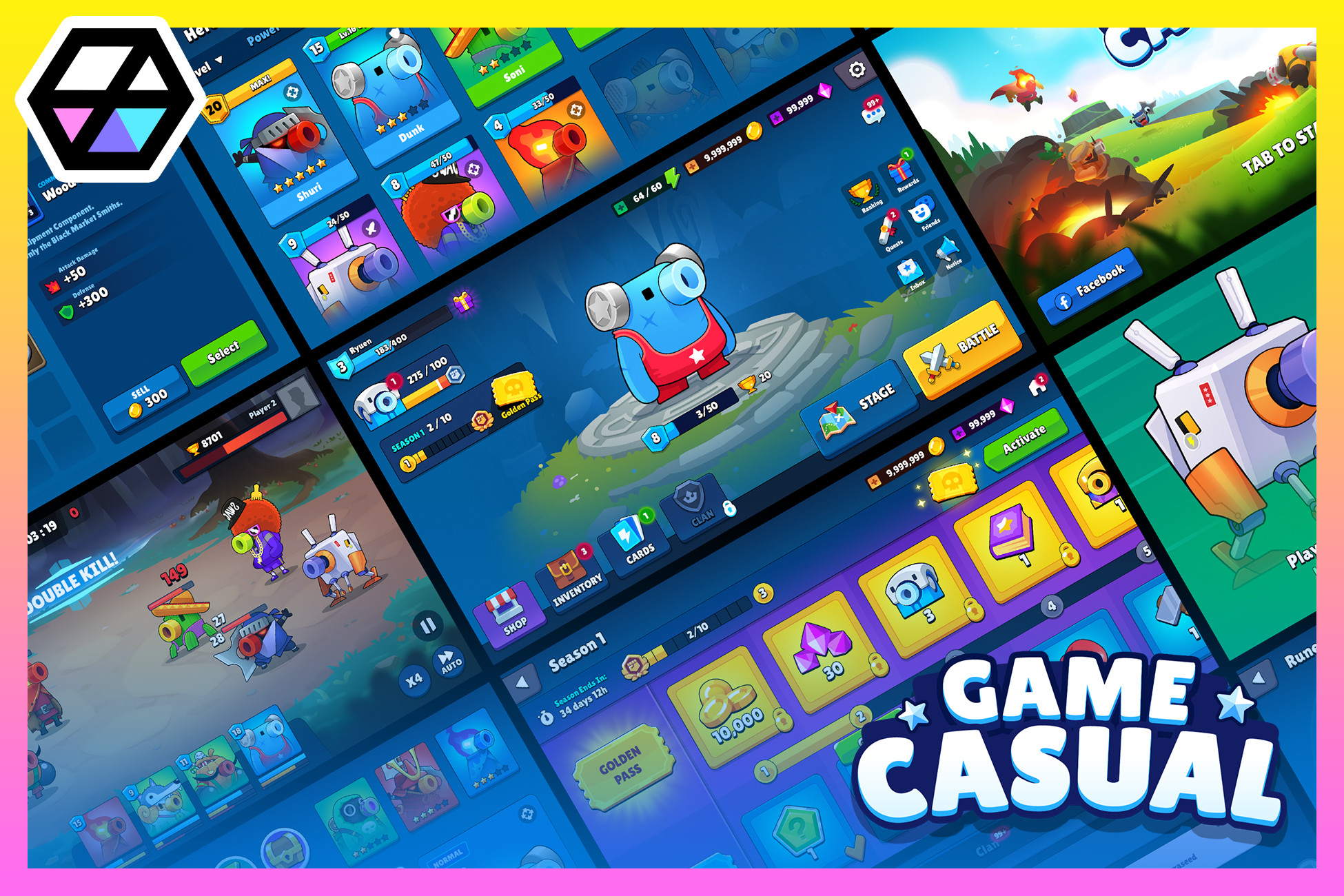
• The GUI Pro - Casual Game is a complete UI asset for creating your own casual style games.
• GUI skin pack that includes layout demo scenes and prefabs.
• Pictogram Icons and Item Icons are included in the asset pack.
• Some UI designs are sliced for 9-patch capability, allowing for resizable elements.
• Some flat design resources are provided in white, allowing for color customization.
• Coding and animation not included
◼ Assets
PNG
• 1200+ sources as PNG
• 324 pictogram icons (32x32, 64x64, 128x128, 256x256, 512x512)
• 98 unique item icons (32x32, 64x64, 128x128, 256x256, 512x512)
• 60 rune icons (64x64, 128x128, 256x256, 512x512)
• 23 shop items (fixed)
• All images included in the demo scene are included in the pack.
• The size of other PNG images, excluding core icons provided in various sizes, matches that displayed on the demo screen.
Prefabs
• 240+ Prefabs
• Buttons
• Frames
• Labels Title
• Popups
• Sliders
• UI_Etc (Alert, InputField, ResourceBar,Swich,Toggle,UserInfo)
• DemoScene_Panels
• DemoScene_Particle
• Each UI used in the demo scene has been created as a prefab.
Scenes
• 52 Demo Scene
• Create your own game using the pre-made demo scene as a reference.
• You can refer to the application cases and layout where the UI resources are applied. Please note that coding and animation are not included.
⛔ Important : Not included editable files. (PSD, SVG, etc)
Prefer a ' Casual Game ' pack with included PSD files?
-> GUI Pro - Casual Game(+PSD)
----------------------------------------------
◼ v1.0 User Notice!!
The font company has suddenly changed its license.
The font included in packages before v1.2.0 was free, but has been prohibited from use in the gaming industry since November 1, 2020.
As a result, the fonts in the GUI PRO Kit-Casual Game have been replaced with other free fonts starting from v1.2.0.
You can check the updated new fonts by previewing screenshots and web demos.
If you are using a package version earlier than 1.2.0, please replace it with the new font included in the versions after 1.2.0~!
The guide document already includes instructions on how to change the font used in the project.
We sincerely apologize for any unintended inconvenience caused.
We would like to express our gratitude to our customers for their trust and support despite the abrupt change.
----------------------------------------------------------
⭐⭐⭐⭐⭐ Your review means the world to us!
Great feedback comes back as even better features.
🏆 Popular GUI Assets
🏆 Popular 3D Assets
----------------------------------------------------------
If there any suggest or idea for improvement feel free to contact me, if it
possible I will add your request in further updates.
📰 Follow us for updates and news!
Discord | Youtube | Facebook | Email
LAYERLAB
Release Notes
---------------
Version 4.1.1
(Released: May 07, 2025)
- Updated PictoIcons
- Renamed icons related to '+, -, ×'
- Added '=' and '÷' icons
- PictoIcon_Equal
- PictoIcon_Divide
- PictoIcon_Equal_Circle
- PictoIcon_Divide_Circle
---------------
Version 4.1.0
(Released: Apr 18, 2025)
- Potion Item Icons Update
- Potion01 : Added new color variants (green, orange, yellow)
- Potion02:
- Renamed resources: (`red` → `pink`, `yellow` → `yellowgreen)
- Added new color variants (green, blue, red, yellow)
---------------
Version 4.0.9
(Released: Mar 21, 2025)
- White png and prefab of StageFrame have been added.
---------------
Version 4.0.8
(Released: March 14, 2025)
- Naming and Organization Changes
- Renamed "ShopIcon" to "ShopItem" for consistency
- Created new folder "Icon_ShopItems" to separate and organize items
- New Color Variants
Added Blue and Green color variants for the following assets:
- ShopItem_Gem
- ShopItem_SpecialChest
- ResourceBar_Btn_Single
- ResourceBar_Icon_Gem
-------------
Version 4.0.7
(Released: Dec 31, 2024)
- Added new sizes for Button01:
- Button01_175 (175 pixels height)
- Button01_195 (195 pixels height)
- Button01_225 (225 pixels height)
- Renamed the existing Button01 to Button01_145
---------------
Version 4.0.6
(Released: Nov 27, 2024)
- Updated User Asset Guide
The previously provided PDF format guide has been replaced with an integrated web page guide. Links to check font information and licensing details have also been added. Please refer to the guide file in the +README+ folder for those links.
---------------
Version 4.0.5
(Released: Nov 18, 2024)
- Added some white sprites and prefabs for the UI.
- Button03_BtnIconText_White
- Button_Hexagon199_White
- Button_Square06_White
- UserInfo01_Left_White
- UserInfo02_Right_White
- Loading_Bg
------------
Version 4.0.4
(Released: Aug 12, 2024)
Demo Scene
- Changed Canvas Resolution (2560x1440)
- Changed Ribbon Title Anchors to Center (Popup_RewardMonth, Popup_Pass, Play_Result)
---------------
Version 4.0.3
(Released: May 24, 2024)
- Unnecessary scripts have been removed from the prefabs.
---------------
Version 4.0.2
(Released: Mar 26, 2024)
- The rune icons that were missing in the last update have been included now.
--------------
Version 4.0.1
(Released: Mar 13, 2024)
- Some resources that can be represented in white have been replaced and added in white.
- In response to this, prefabs related to Slider and UI_Etc have been added.
- The demo scene control script is consolidated into one. (Assets/Layer Lab/Scripts)
- Version Update -> 2021.3.30f1
------------------------------------------------------------------------------------------- Version 4.0.0
(Released: Mar 12, 2024)
Version 4.0: Important Changes
Starting from version 4.0, the provision of PSD files will be excluded from the package.
Please note that buyers of version 4.0 and later will not have access to PSD files.
For those who made purchases prior to version 4.0 and still require PSD files, rest assured! You can request PSD file support via our dedicated support email until 2024. Simply reach out to us at (support@layerlab.io), and we'll be more than happy to assist you.
After 2025, PSD file support will no longer be available. We recommend backing up your files in advance.
Please make sure to check ➡️ LayerLab announcements.
Thank you for your understanding and ongoing support!
--------------
Update Notice:
- All files have been organized into the 'Layer Lab' parent folder for better structure.
- Guide Documents have been updated.
Prefabs:
- Added white versions of UI prefabs, facilitating color customization in Unity.
- Skill Frame prefabs are now included.
- Added red fill color to Slider_BasicTrapezoid01.
- Added blue fill color to Slider_BasicTrapezoid02.
- Introduced SkillFrame02.
Updated prefabs in the following folders:
- Prefabs_Component_Buttons
- Prefabs_Component_Frames
- Prefabs_Component_Labels
- Prefabs_Component_Popups
- Prefabs_Component_Sliders
- Sliders, UI, etc., Panels prefabs are in line for an upcoming update.
Sprites:
- White PNGs have been introduced or replaced for certain elements, allowing color customization.
- Sprite names have been changed to better match prefab compositions.
- Icon_Chest_Open has been added.
-------------------------------------------------------------------------------------------
Version 3.0.1
(Released: Dec 05. 2023)
- 'Frame_CardFrame' related resources have been modified and added.
- 'Frame_CardFrame' PreFabs has been modified.
----------------
Version 3.0.0
(Released: June 2. 2023)
- Update Guide Document
- Modify PSD : Some changes have been made to meet the scope of provide.
- If a buyer below v2.0 needs a v2.0 package, please let me know the product name and invoice number by email. (support@layerlab.io)
------------------------------------------------------------------------------------------- Version 2.0.8
(Released: Apr 14. 2023)
-Added Q&A to Readme Guide document
When Material UIA Didiate doesn't work properly and looks like normal UI/default shader
---------------
Version 2.0.7
(Released: Jan 25. 2023)
-Modify Prefabs
Prefabs.Demo_UI > RewardMonth
Prefabs.Demo_UI > RewardWeek
---------------
Version 2.0.6
(Released: Jan 18. 2023)
-Add Title ribbon blue color
Component > Label > Label_TitleRibbon_Blue
Prefabs_Component_Label > Label_TitleRibbon_Blue
--------------
Version 2.0.5
(Released: Jan 6. 2023)
-Add PNG
Component > Popup > Popup_MiddeFrame03
Component > Frame > Frame_BasicFrame_Square10
Component > Label > Label_TitleFlag02_(5 color)
-Modify PNG name
Label_TitleFlag -> Label_TitleFlag01
-ADD Demo Scene
Popup_RewardGet
*Add to resource prefabs related to the above
---------------
Version 2.0.4
(Released: Nov 22, 2022)
-Delete script from demo prefab.
(Fixed an issue detected while importing the prefab file.)
---------------
Version 2.0.3
(Released: Sep 21, 2021)
- Changed namespace of the UIParticleSystem script (We made it possible for scripts to interact with other packages without overlapping.)
- Changed name of the Panel script and PanelControl script
- Folder Name Change : Prefabs_Fx_Particle -> Prefabs_DemoScene_Particle
---------------
- Version 2.0.2
(Released: Aug 9, 2021)
- Add missing Ad_Remove demo panel - Add large Ad Tv icon : (Demo_Icon > ImageIcon_Ad_01_l)
- Delete v1.0
- Renamed top folders and repackaged PSD and some icons.
---------------
Version 2.0.1
(Released: Jul 29, 2021)
- Reduced the size of the PSD file.
---------------
Version 2.0.0
(Released: Jun 1, 2021)
- The Sprite folder, which was categorized based on the demo scene, was reclassified to fit the component. (Buttons, Frames, Labels, Popups, etc…..)
- Removed duplicate elements
- Some integrated image elements -> Separate with frames and icons
- Inserted some missing button components
- Modifies the area of the particle
------------------------------------------------------------------------------------------- Version 1.3.5
(Released: Apr 2, 2021)
DemoScene
- Title_Popup_Login : update the font in the footer
- Lobby_Panel_Heroes_Detail_SuperPassive Panel: Modify typo
---------------
Version 1.3.4
(Released: Feb 8, 2021)
- Fix button prefab error of 10 color types
---------------
Version 1.3.3
(Released: Feb 2, 2021)
- Added flag icon for Setting Language. (Vietnam, Arabic)
- Modify Guide Document : Added information about Basic Setup, PanelControl, Outline Fonts.
---------------
Version 1.3.2
(Released: jan 25, 2021)
- Canvas Scaler : Change Reference Resolution (2560x1440)
- Guide Document: Modify the contents of Basic Setup
---------------
Version 1.3.1
(Released: jan 18, 2021)
- RuneIcons -> Added a base frame without a rune icon.
- Changed the namespace of the PanelControl script.
---------------
Version 1.3.0
(Released: jan 8, 2021)
- Demo Scene : Add "RuneFuse" panel.
- New 60 Rune Icons included. (64x64,128x128,256x256,512x512)
- Add 10 Item Icons. (32x32,64x64,128x128,256x256,512x512)
- Unity version : 2019.4.4f1 -> 2019.4.0f1
---------------
Version 1.2.2
(Released: Dec 24, 2020)
- Files in the "PSD" and "Sprite-> _ Icons" folders are packaged.
- Add Missing Guide Document
---------------
Version 1.2.1
(Released: Nov 30, 2020)
- Add "Extended ASCII" fonts (Font in â,ñ,Ê,ÿ,ÿ, etc. format)
- Demo scene "BackGlow" Image : UIAdditive inserted in Missing Material.
---------------
Version 1.2.0
(Released: Nov 1, 2020)
- Font Change As of November 1, 2020, the game industry banned the use of Cookie Run Font, which is provided free of charge by DevSisters.
As a result, the Font used in 'GUI Pro Kit - Casual Game' has been completely replaced. (The font was changed to a more global and refined font.)
Please check the link below for related announcements.
(Unfortunately, this page does not provide a global language.) https://www.cookierunfont.com/#section7
--
However, the following are commercial/non-commercial as a result of the changed policy on or after November 1, 2020: All use is prohibited. forbidden commercial/non-commercial use : Game Industry Group (PC/Mobile)
* The industry does not embed, bundle, or redistribute software. It also prohibits the use of secondary creations using fonts.
---------------
Version 1.1.3
(Released: Oct 16, 2020)
- Demo Scene : Added "Chat" panel. - Play_Type1 panel : Added Joystick UI.
---------------
Version 1.1.0
(Released: Sep 11, 2020)
- PSD(60+) included.
---------------
Version 1.0.0
(Released: Sep 10, 2020)
First release


Basic Information
- Latest Version
- 4.1.1 (07 May 2025)
- Publisher
- LAYERLAB
- Category
- 2D/GUI
- Size
- 134.3 MB
- Price
- €18.39
- Asset Rating
- ★ ★ ★ ★ ★ (114)
Extended Information
- Unity Versions
- 2021.3.30
- Render Pipelines
- ✔ BIRP ✔ URP
- State
- published